
For interviews, lectures, podcasts & webinars
A 60-minute talk in.A highlight out.
You decide what matters.
No editing skills needed. NexClip lists every topic in your video — you tick the ones to keep, and it builds the highlight: opening hook, intro, subtitles included.

macOS 26+ · Apple Silicon · English & 日本語 · No credit card required
Free exports carry a small watermark.
“It's like having an extra employee on staff.”
Three steps. That's the whole app.
Drop in your video
Any interview, lecture or webinar. MP4, MOV, or audio files.
Tick the topics to keep
NexClip lists what was talked about. You choose what stays.
Done. Watch and export
A subtitled highlight. Watch it, tweak it, export it.
One video in. Three things out.
The key parts of your video — by topic — edited into one watchable piece, in the original order. Long enough to run YouTube mid-roll ads (8 min+), so it can earn — not just a short that barely does.
On YouTube, videos 8 minutes and up can run mid-roll ads. If your channel is in the YouTube Partner Program, your highlight is ad-eligible.
Shorts are where new people find you. One topic, under 90 seconds, vertical — and every short opens with a hook, so the first 3 seconds earn the next 60. The camera follows whoever is speaking.
Any single topic as its own video. Pick it from the list.
Auto-build is just the starting point.
Every topic stays editable — reframe, trim to the frame, and clean up fillers exactly how you like.
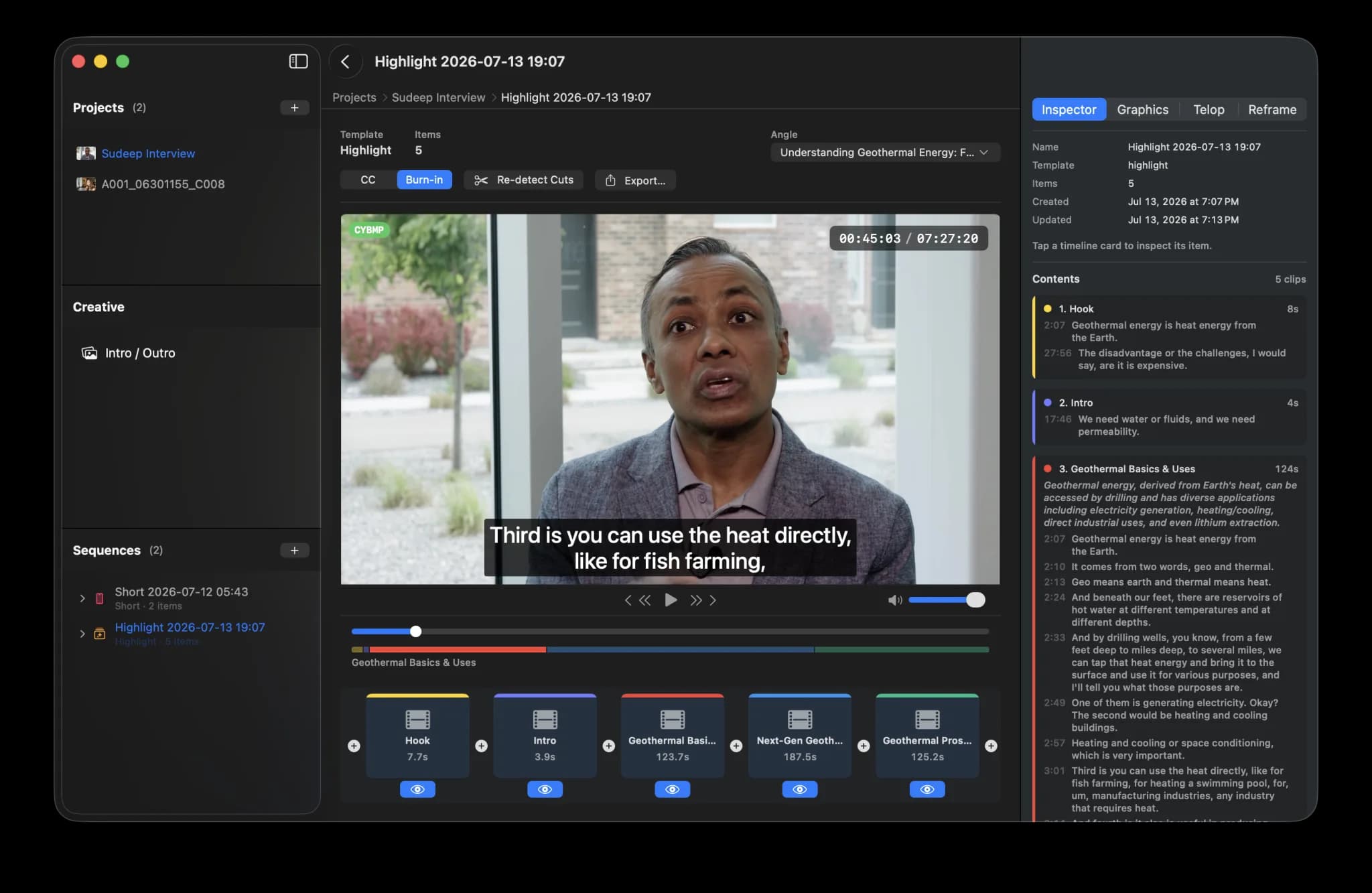
8:03 highlight + 0:45 short + topic clips
Faithful to what was actually said — a focused first cut, not a final cut.
The finishing touches are automatic.
Subtitles
Subtitles appear on their own. Change the look, or turn them off.
Auto-cut
"Um"s and false starts are removed for you. Your original video is never modified.
Titles & logos
Chapter titles and speaker names are suggested from the sequence you built. Pick the ones you want.
Export
Export as MP4 to post anywhere. Pros can hand off to Final Cut or Premiere (Pro plan).
Your video stays on your Mac — only the audio is sent for transcription.
Audio is deleted right after processing.
Privacy policy →Who it's for
Podcasters
New listeners won't start with episode 84. Give them the 8-minute version.
Educators
Students don't rewatch a 90-minute lecture. They rewatch the topic they missed.
Marketing teams
The webinar is over, the answers are in it. Send the 5-minute version in your follow-up.
“NexClip AI is a wonderful tool that would benefit any video production company, department or news and information organizations. It is extremely fast, intuitive and easy to use for those of us who are not incredibly tech-savvy. It saves time and does the more mundane part of the editing process for you. It's like having an extra employee on staff. Once you use this great app, you will wonder how you survived so long without it!”
Observed in testing: from downloading the app to exporting his first highlight, under 10 minutes — first time using it, on an 18-minute recording, on an M1 iMac.
Your first video is completely free.
Up to 60 minutes — the transcription is on us, and your 45 starting credits cover the highlight. No credit card. Free exports carry a small watermark.
After that, credits are spent on video minutes (1 min = 1 credit) and on builds.
Free
Your first video is on us.
- First video (up to 60 min): transcription free
- 45 credits to get you started (one-time)
- Watermarked exports, 5 per month
- No credit card required
Creator
For podcasters and educators who publish weekly.
- 450 credits/month (≈ 7.5 hours of video)
- Everything in Free
- No watermark
- AI intro/outro images
- Email support
Pro
For teams and heavy users.
- 1,200 credits/month (≈ 20 hours of video)
- Everything in Creator
- Priority support
- Early access to new features
- Final Cut & Premiere XML export
Need more credits?
One-time credit packs available on any plan.
Pack S
Pack M
Pack L
Build credits: Highlight 10 · Short 8 · Angle switch 8 (first angle included) · Topic clip 3 · AI intro/outro 10 · Subtitles, exports & edits 0
Cancel anytime.
FAQ
Everything you need to know.
Try it on one real video.
Your first video costs you nothing — up to 60 minutes, no credit card.